Sunday, October 18, 2015


Thursday, November 13, 2014
Infant Nutrition Calculator
This app is meant for use by dietitians, pediatricians and pediatric sub specialists to quickly and accurately calculate nutritional intake of infants on feeding formulas.
Important features:
1. Easy, intuitive interface
2. Allows for entry of two feeding formulas
3. Ability to select concentration of each formula
3. Detailed nutritional intake calculations
Here are some screen shots:


Important features:
1. Easy, intuitive interface
2. Allows for entry of two feeding formulas
3. Ability to select concentration of each formula
3. Detailed nutritional intake calculations
Here are some screen shots:
Date entry screen:


Result pane:

Here is screenshot of Powdered formula recipe calculator

Thursday, May 15, 2014
Q & A for NICU Nutrition Calculator Version 2
Feeds-related questions:
1. All of the calculations using fortifiers are using the preterm BM reference. Is there a plan to have these same options for term BM and donor milk as well?
1. All of the calculations using fortifiers are using the preterm BM reference. Is there a plan to have these same options for term BM and donor milk as well?
Good point. The difficulty is
that every nursery uses their own set of calculated values for breast milk with
additives. Furthermore, in case of donor BM, we are now getting donor milk
labeled with different caloric values. So when I started planning this app I
decided to include only the information provided to me by feeding formula
companies or from reputable sources. I also worked hard to implement a feature
in the app whereby user could add their own formulations.
So, in this case, you have
two options:
A. You can add these and
other formulations to “CUSTOM” group of formulas. These formulations will be
saved and listed under “Custom” button and can be used for calculations just
like pre-programmed ones. Here is a link to instructions for adding custom formulas: http://avsideas-eclectic.blogspot.com/2012/12/how-to-add-custom-formulas_17.html
B. You can edit composition
of formulas already included in the “BM" group to values you use in your
nursery. Here is link to instructions for doing that: http://avsideas-eclectic.blogspot.com/2013/01/how-to-edit-formula-composition.html
2. Is there a plan to allow user to enter two set of feeding formula values? Some of our premies have mixed intake like this.
Yes. Next update, which is
only a few weeks away, has this feature.
3. Is it possible to add calculations for % calories
from various macronutrients to the next version?
This feature, too, is coming
soon.
TPN-related questions:
1. Calculations seem to be incorrect when baby is on feeds as well as TPN
The most common reason for this is incorrect selection of first item in preference page. Please check that you have selected correctly. When baby is on feeds + TPN, the amount of TPN baby will actually receive will depend on the choice you have made. In the first case: amount of TPN infused will be (TPN Volume ordered - Feed volume). In the second case the entire ordered volume will be given to the baby.
Second reason is improper selection of second and third item in Preferences page. So you are entering dextrose as % value when in fact you have selected GIR option in preference page.
If you have made all the correct choices in Preferences page and are still getting unexpected results, please send me an email detailing the discrepancy using "Email comments and suggestions" in help menu.
2. Can you add ability to enter amino acids dose in TPN as % solution?
This will be part of the next update.
3. Can you include TPN Calcium and Phosphorus entry in these calculations?
There is a lot of variability among NICUs how these micronutrients are ordered. That is the reason for not including these entries. If users can leave me a feedback on this page as to how they order calcium and phosphorus in TPN and what the output values they expect, I can include these calculations in the next update.
TPN-related questions:
1. Calculations seem to be incorrect when baby is on feeds as well as TPN
The most common reason for this is incorrect selection of first item in preference page. Please check that you have selected correctly. When baby is on feeds + TPN, the amount of TPN baby will actually receive will depend on the choice you have made. In the first case: amount of TPN infused will be (TPN Volume ordered - Feed volume). In the second case the entire ordered volume will be given to the baby.
Second reason is improper selection of second and third item in Preferences page. So you are entering dextrose as % value when in fact you have selected GIR option in preference page.
If you have made all the correct choices in Preferences page and are still getting unexpected results, please send me an email detailing the discrepancy using "Email comments and suggestions" in help menu.
2. Can you add ability to enter amino acids dose in TPN as % solution?
This will be part of the next update.
3. Can you include TPN Calcium and Phosphorus entry in these calculations?
There is a lot of variability among NICUs how these micronutrients are ordered. That is the reason for not including these entries. If users can leave me a feedback on this page as to how they order calcium and phosphorus in TPN and what the output values they expect, I can include these calculations in the next update.
Sunday, September 29, 2013
Android version: How to edit formulas & add formulas to the database
To Edit formula composition:


For other two groups, manufacturers require that formula compositions are not changed by the user.


Then touch "Save Changes" button to save changes to database. Use the "Back" button on the bottom to cancel changes.
To add formulas to the BM group or custom group:

This view is empty because there are no formulas in Custom group when you launch the app.
Touch the "Add Custom Formula" button at the bottom (this button is titled "Add Custom BM formula"in the BM group.
You cannot add formulas to the Premie and Other group.


Saturday, September 28, 2013
Android Version of NICU Nutrition Calculator
Android Version of NICU Nutrition Calculator basically mirrors all the functionality of the iPhone app in an android environment. Some of the controls are located in different places on the screen but basically navigation through the app is the same.
Follow this link to find out how to edit or add formulas to the database.
With the first launch of the app, you will be taken to the Preferences panel:
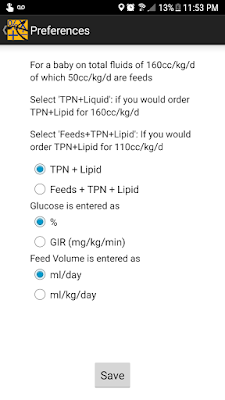
Make selection in each of the three categories and touch "Save".
You will then see the data entry screen of the app. Select what kind of input you want to make at the top of the screen: "Feeds" only, "Both" and "TPN" only.
This is feeds screen:

Enter Weight and feed volume (ml/day or ml/kg/day depending your choice in preferences)
Touch "Select Formula 1"row and you will be taken to formula selection screen (see below). Select type of formula at the top of the screen. Then in the panel below Select name of the formula and concentration (if available by touching the concentration number and selecting concentration)
Once you have selected the formula touch "Select" button at the bottom of the screen.
Enter Liquid protein value if required.
Repeat the same process to enter Formula 2 volume and select formula 2 if necessary.
Formula Selection screen below:

This is the TPN screen:
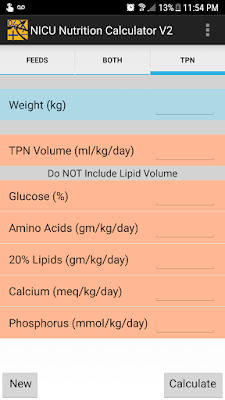
In this screen enter all the values using numeric keypad.
Remember:
1. Do not include lipid volume in TPN volume
2. Glucose entry will be as % or as GIR depending on you selection in preferences panel
3. Lipid entry is optional
Touch "Calculate" once you have completed entering required information.

Follow this link to find out how to edit or add formulas to the database.
With the first launch of the app, you will be taken to the Preferences panel:

Make selection in each of the three categories and touch "Save".
You will then see the data entry screen of the app. Select what kind of input you want to make at the top of the screen: "Feeds" only, "Both" and "TPN" only.
This is feeds screen:

Enter Weight and feed volume (ml/day or ml/kg/day depending your choice in preferences)
Touch "Select Formula 1"row and you will be taken to formula selection screen (see below). Select type of formula at the top of the screen. Then in the panel below Select name of the formula and concentration (if available by touching the concentration number and selecting concentration)
Once you have selected the formula touch "Select" button at the bottom of the screen.
Enter Liquid protein value if required.
Repeat the same process to enter Formula 2 volume and select formula 2 if necessary.
Formula Selection screen below:

This is the TPN screen:

In this screen enter all the values using numeric keypad.
Remember:
1. Do not include lipid volume in TPN volume
2. Glucose entry will be as % or as GIR depending on you selection in preferences panel
3. Lipid entry is optional
Touch "Calculate" once you have completed entering required information.

From here you can either touch "back" arrow at top left corner and start a new calculation OR use Android "Back" button at the bottom of the screen to go back to a previous screen to change some intake parameter to see it's effect on nutritional intake.
Saturday, February 2, 2013
NICU Nutrition Calculator 2.0
Please follow this link for information about this update and further links to different new functionality in the app.
There are two walk-through videos below
1. Preferences panel: this is new in version 2 so that users can individualize how data is entered and how calculations are performed.
Preferences panel
2. How to use the app:
Friday, January 11, 2013
How to "Edit" formula Composition
One of the common improvement suggestions I have received is to allow users to edit formula compositions, especially for BM based formulations. Thus in this app you can only modify compositions of "BM based" formulas or Custom formulas.
Here is how:


Here is how:
In the formula composition screen, there will be an "Edit" button in right upper corner
for formulas that you can edit composition of.

Touch the edit button and the screen will change to one below

Touch inside any field and using the keyboard which pops-up
make desired change to the composition.
Then touch the "Done" button and changes will be saved.

That's it.
Subscribe to:
Posts (Atom)