Sunday, September 29, 2013

Android version: How to edit formulas & add formulas to the database

To Edit formula composition:


Go to Menu and select "Manage Formulas"
Select either BM based or Custom formulas.
For other two groups, manufacturers require that formula compositions are not changed by the user.
 Touch the name of the formula that you want to edit.
 In formula values screen, touch the "Edit Values" button at the bottom of the screen.
Touch the field that you need to edit and make changes.
Then touch "Save Changes" button to save changes to database. Use the "Back" button on the bottom to cancel changes.


To add formulas to the BM group or custom group:


Touch the name of the group to go to list of formulas.
This view is empty because there are no formulas in Custom group when you launch the app.

Touch the "Add Custom Formula" button at the bottom (this button is titled "Add Custom BM formula"in the BM group.

You cannot add formulas to the Premie and Other group.
Using keypad enter some or all the details for the custom formula.
Touch "Add Formula" button and you are done. This formula will be added to the database and you can access it from the "feeds" screen.

Saturday, September 28, 2013

Android Version of NICU Nutrition Calculator

Android Version of NICU Nutrition Calculator basically mirrors all the functionality of the iPhone app in an android environment. Some of the controls are located in different places on the screen but basically navigation through the app is the same.

Follow this link to find out how to edit or add formulas to the database.

With the first launch of the app, you will be taken to the Preferences panel:
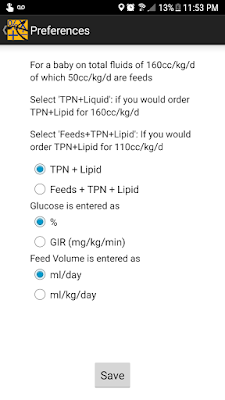

Make selection in each of the three categories and touch "Save".


You will then see the data entry screen of the app. Select what kind of input you want to make at the top of the screen: "Feeds" only, "Both" and "TPN" only.

This is feeds screen:


Enter Weight and feed volume (ml/day or ml/kg/day depending your choice in preferences)

Touch "Select Formula 1"row and you will be taken to formula selection screen (see below). Select type of formula at the top of the screen. Then in the panel below Select name of the formula and concentration (if available by touching the concentration number and selecting concentration)

Once you have selected the formula touch "Select" button at the bottom of the screen.

Enter Liquid protein value if required.

Repeat the same process to enter Formula 2 volume and select formula 2 if necessary.


Formula Selection screen below:


This is the TPN screen:
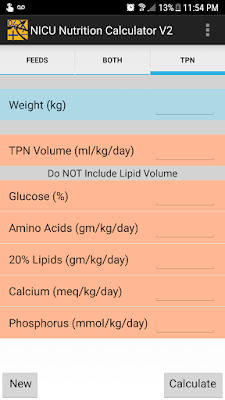

In this screen enter all the values using numeric keypad.

Remember:

1. Do not include lipid volume in TPN volume
2. Glucose entry will be as % or as GIR depending on you selection in preferences panel
3. Lipid entry is optional


Touch "Calculate" once you have completed entering required information.


From here you can either touch "back" arrow at top left corner and start a new calculation OR use Android "Back" button at the bottom of the screen to go back to a previous screen to change some intake parameter to see it's effect on nutritional intake.

Saturday, February 2, 2013

NICU Nutrition Calculator 2.0

Please follow this link for Q & A for this version.

Please follow this link for information about this update and further links to different new functionality in the app.

There are two walk-through videos below

1. Preferences panel: this is new in version 2 so that users can individualize how data is entered and how calculations are performed.

Preferences panel


2. How to use the app:


-->

Friday, January 11, 2013

How to "Edit" formula Composition

One of the common improvement suggestions I have received is to allow users to edit formula compositions, especially for BM based formulations. Thus in this app you can only modify compositions of "BM based" formulas or Custom formulas.

Here is how:

In the formula composition screen, there will be an "Edit" button in right upper corner 
for formulas that you can edit composition of.


Touch the edit button and the screen will change to one below


Touch inside any field and using the keyboard which pops-up 
make desired change to the composition.
Then touch the "Done" button and changes will be saved.


That's it.


Monday, December 17, 2012

How to add formulas to "Custom" group

This update of the app allows you to add your own custom formulas to the database.

Go to the "Help & Info" section &
Touch "Manage Formulas"


Touch "BM based" or "Custom Formulas"


Touch the "+" button


Enter details of the formula and touch "Done"


The new formula will now be listed in the "Custom Formulas" list.


Tuesday, December 11, 2012

What's new in the "NICU Nutrition Calculator" update 2

-->
Click here to watch walk-through videos of the version 2.0 of the app.

Four main changes are:

1. Easier selection of formulas: The original version of the app had a long list of formulas in scroll wheel. With this update selecting formula at a specific concentration is much easier. First you first select the formula name in the first scroll wheel and then select the desired concentration from the second scroll wheel. The second scroll wheel will only load concentrations available for each specific formula.

2. Ability to add formulas to BM based group or to custom formulas: Follow this link for instructions.
YOU MUST SYNC YOU DEVICE WITH iTUNES SO THAT BACK-UP OF YOUR CUSTOM LIST IS SAVED.

3. Edit composition of BM-based or Custom formulas: follow this link for instructions.

4. Set up preferences: There is a wide variability in how TPN is ordered in different NICUs. This form allows you to specify how you would like to enter values and how calculations are performed. You must set preferences in Help menu before you use the app. 


There are three items in this form:
a. Calculation of total fluids when baby is on combined feeds and TPN intake.
aa. Select first segment if, in you NICU, TPN + IL are ordered for the entire total fluid volume. Actual amount of TPN baby receives in this case depends on how much feeds baby is on. TPN volume is reduced by the corresponding amount.
bb. Select second segment if in your nursery feed volume is calculated for the day and TPN + IL is ordered for the remainder of total fluids. In this case entire TPN volume is delivered to the baby.
For example: Say you have a baby who is on total fluids of 160cc/kg/d of which 50ml/kg/d are feeds. Select option aa (first segment) if you would write TPN+IL for volume of 160cc/kg/d. Select option bb (second segment) f you would write TPN+IL for a volume of 110cc/kg/d (160 - 50). 
b. Glucose entry: select whether you will enter glucose as % or as GIR i.e. glucose infusion rate
c. Feed volume: select whether you will enter feed volume as ml/day or ml/kg/d.

Other improvements in the app are:

1. Inclusion of feeding formulas made by Nestle Nutrition and Prolacta Bioscience.
2. Calculation of PE ratio when baby is on full feeds.
3. Calculation of iron intake.
4. Tailor the list of formulas under each segment selection. Go to Help menu, touch manage formulas, select the specific type of formula and in the next screen touch the “check mark” button or the button titled “Select”. All the formulas in that category will be loaded in the table. You can touch and uncheck formulas that you want to remove from the list (“check mark” will be removed from those formulas) and then touch “Done”. When you next go to the feeds entry screen formulas which you un-selected will not clutter up the list.

Wednesday, May 2, 2012

How calculations are performed

NICU Nutrition Calculator Version 2.0

How are calculations performed:

Feeds only: fairly straight-forward. Different nutritional values are looked-up in the database and intake/kg calculated.

TPN Only: In version 2.0 Lipid volume is not included in the TPN volume and all intralipids are assumed to have been infused. Thus Total volume = TPN volume + Intralipid volume.

For example, D10TPN with 3gms/kg/d of AA at 65 cc/kg/d and Lipids 3gms/kg/d = 15cc/kg/d gives total fluids of 80cc/kg/d.

Dextrose calories/kg  = (gms of dextrose (taking into account TPN  fraction) * 3.4)/weight
Proteins calories/kg = (gms/kg of Amino acids ordered * TPN fraction) * 4
Lipid calories/kg = gms/kg of Lipids ordered * 10
GIR = ((dextrose concentration in %) * (actual TPN rate in ml/hr) * 0.167) divided by weight

Both TPN & Feeds: Depending on the selection made in the preferences panel, calculations are performed differently.